The Best Volume Profile Indicator for NinjaTrader 8
See where the real volume sits. The most advanced volume profile indicator on the market — with auto profile splitting, HVN/LVN detection, TPO overlay, 5 color modes, and 22 exportable plots for your strategies.
Stop guessing where support and resistance are. This indicator shows you exactly where volume was traded — by price level, by session, with full buyer/seller breakdown. See the POC, Value Area, VWAP, high and low volume nodes, and the profile shape — all updating in real time. Whether you're scalping 5-minute bars or building swing trade levels from weekly profiles, this is the volume profile tool that professional NinjaTrader traders reach for.
1. Video Overview
See the indicator in action. Watch how it renders on live NinjaTrader 8 charts, switch between profile types and color modes, and use the key levels for real trading decisions.
Product Overview
Feature Deep Dive
2. Why Traders Choose This Indicator
A standard volume bar tells you how much was traded on a candle. The volume profile tells you where. It breaks down each session's volume by price level — revealing exactly where buyers and sellers were most active. That's the difference between watching the scoreboard and watching the game.
◈ Find Support & Resistance That Actually Works
High-volume price levels act as magnets. Price slows down, consolidates, or reverses at these levels because that's where the most trading interest exists. Low-volume areas? Price accelerates through them. The profile shows you both — so you know where to trade and where to avoid.
◈ Know Who's In Control — Buyers or Sellers
With Buy/Sell and Delta color modes, every price level in the profile is colored by who dominated — aggressive buyers or aggressive sellers. Instantly see the directional story behind the volume distribution. This isn't just structure — it's order flow context.
◈ Auto-Split Composite Profiles
When the market shifts value during a session (morning range vs. afternoon breakout), a single profile gives you a misleading picture. Our indicator automatically detects composite shapes and splits them into sub-profiles, each with its own POC and Value Area. No other NinjaTrader volume profile does this.
◈ Build Strategies on Volume Profile Data
22 exportable NinjaScript plots give you programmatic access to every key level — POC, VAH, VAL, VWAP, HVN/LVN prices, TPO levels — for both the current and previous session. Use them in AlgoStudio Pro, Market Analyzer, or your own custom strategies.
Volume Profile Gives You the Edge
- Identify support & resistance by volume — not by arbitrary lines or lagging indicators. High-volume levels are where the market actually found agreement.
- Find breakout zones before they trigger — Low Volume Nodes are thin-air zones. When price enters one, it accelerates. Know where these are before the move.
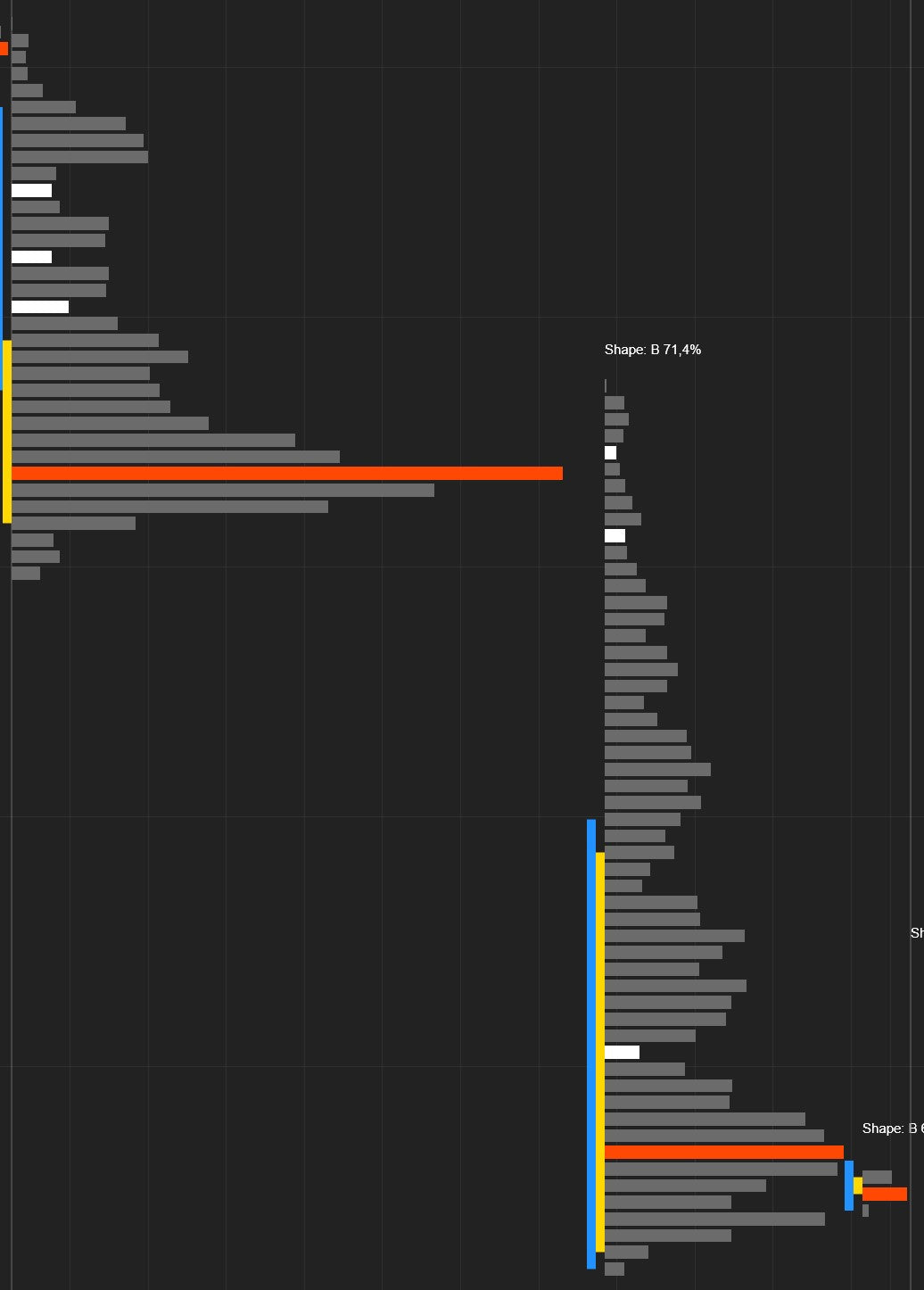
- Read market sentiment from the shape — A bell curve (B-shape) means balance. A P-shape means buyers drove price up from lows. A D-shape means sellers pushed it down. The profile tells you the story.
- Know fair value at a glance — The POC is where the most volume traded — it's fair value. VWAP is the volume-weighted average cost. These are the levels institutions watch.
3. Eight Profile Types — Every Timeframe Covered
Choose how the volume data is grouped. By trading session? By custom time window? By bar count? By what's visible on your screen? Switch instantly from the chart toolbar.
Each profile gets its own POC, Value Area, VWAP, HVN/LVN detection, and pivot lines.
Daily Session
A fresh volume profile for each trading day. The most popular choice for intraday traders. See where today's volume is concentrating and use yesterday's levels as support and resistance.
Trade it: Yesterday's POC is a magnet. Yesterday's VAH/VAL are natural reversal zones. A break outside yesterday's value area signals a potential trend day.
Weekly Session
An entire week of volume aggregated into one profile. Smooths out daily noise and reveals the dominant price levels for the week.
Trade it: Weekly POC + daily POC at the same price = high-confidence level. Weekly profiles are perfect for swing trade planning.
Monthly Session
One profile per calendar month. The big picture view. Monthly profiles reveal structural levels built over weeks of trading — the levels that drive the largest moves.
Trade it: When price deviates far from the monthly POC, mean-reversion setups are attractive. Monthly VAH/VAL mark institutional interest zones.
Custom Session (Up to 5)
Define up to 5 custom time windows per day with start and end times. Build profiles for the Asian session, the European open, the US cash session, the close — whatever matters to your strategy.
Trade it: Compare overnight vs. regular session volume. Levels where session profiles overlap are especially strong.
Fixed Interval
Automatically divides each session into equal-duration time blocks. Set the start time, end time, and duration in minutes. Watch how volume distribution evolves as the session progresses.
Trade it: A POC that shifts higher across consecutive intervals confirms an uptrend. Compare morning vs. afternoon blocks to anticipate the close.
Visible Range
A single dynamic profile for everything visible on your chart. Scroll or zoom and the profile recalculates automatically. Zero configuration — instant analysis of whatever you're looking at.
Trade it: Zoom into a range, a pullback, or a breakout and instantly see where volume concentrated. Perfect for quick ad-hoc analysis.
Every X Bars
A new profile every N bars. Works on any bar type — time, range, Renko, tick. Set it to 6 bars on a 5-minute chart for 30-minute profiles, or 12 for 60-minute profiles.
Trade it: Ideal for range/Renko traders who can't use time-based sessions. Get rolling volume profiles on any bar type.
All Bars
One massive profile spanning all loaded data. The ultimate macro view showing where volume concentrated across your entire chart. The all-bars POC is the ultimate fair value reference.
Trade it: Price above the all-bars POC = long-term bullish bias. Below it = bearish. Use the all-bars VAH/VAL as macro range boundaries.
Number of previous profiles to show setting to limit how many profiles render. Set to 0 for all, or a number like 3–5 to keep things fast and focused.4. Five Color Modes — See What Matters
The color mode determines what each volume bar tells you at a glance. From clean monochrome to full delta visualization, pick the view that matches your trading style.
Mono
Clean, single-color profile. No directional information — just pure volume distribution shape. The minimalist's choice. Great for shape analysis and screenshots.
Heatmap
Volume intensity as a smooth color gradient — from cool (low volume) to hot (high volume). The profile becomes a thermal image of activity. Instantly spot the "hot zones" where traders are most active.
Buy/Sell (Default)
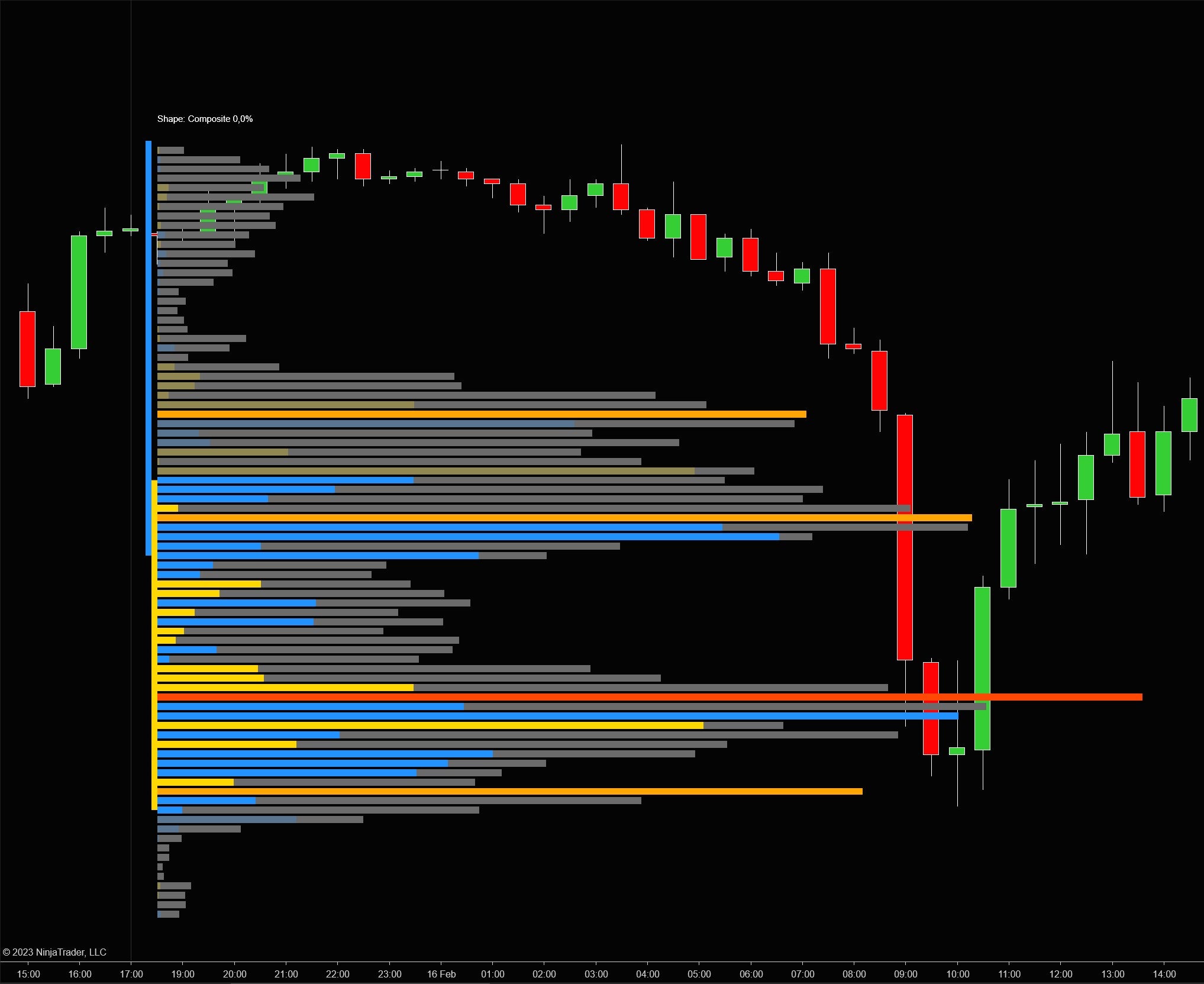
Each bar colored by who dominated — buyers or sellers. Volume on the ask gets one color, volume on the bid another. Inside the value area uses full opacity; outside uses reduced opacity for visual depth. Most popular mode.
Delta
Colors each level by net delta (ask minus bid). Shows the imbalance at each price — how one-sided the activity was. Strong positive delta at the lows = potential support. Strong negative delta at the highs = resistance.
Delta & Volume — The Complete Picture
The most information-dense mode. Combines volume bars with a delta overlay. See both the total volume distribution and the directional imbalance in a single view. You get the profile shape, the POC, the value area, AND who controlled each level — all at once.
Inside vs. Outside Value Area
Regardless of color mode, bars inside the value area render at full opacity while bars outside use reduced opacity. This creates a natural visual emphasis on the zone where the majority of volume traded. All 6 inside/outside colors (Up, Down, Neutral for each) are individually customizable.
5. Key Levels & Pivot Lines — Your Trading Roadmap
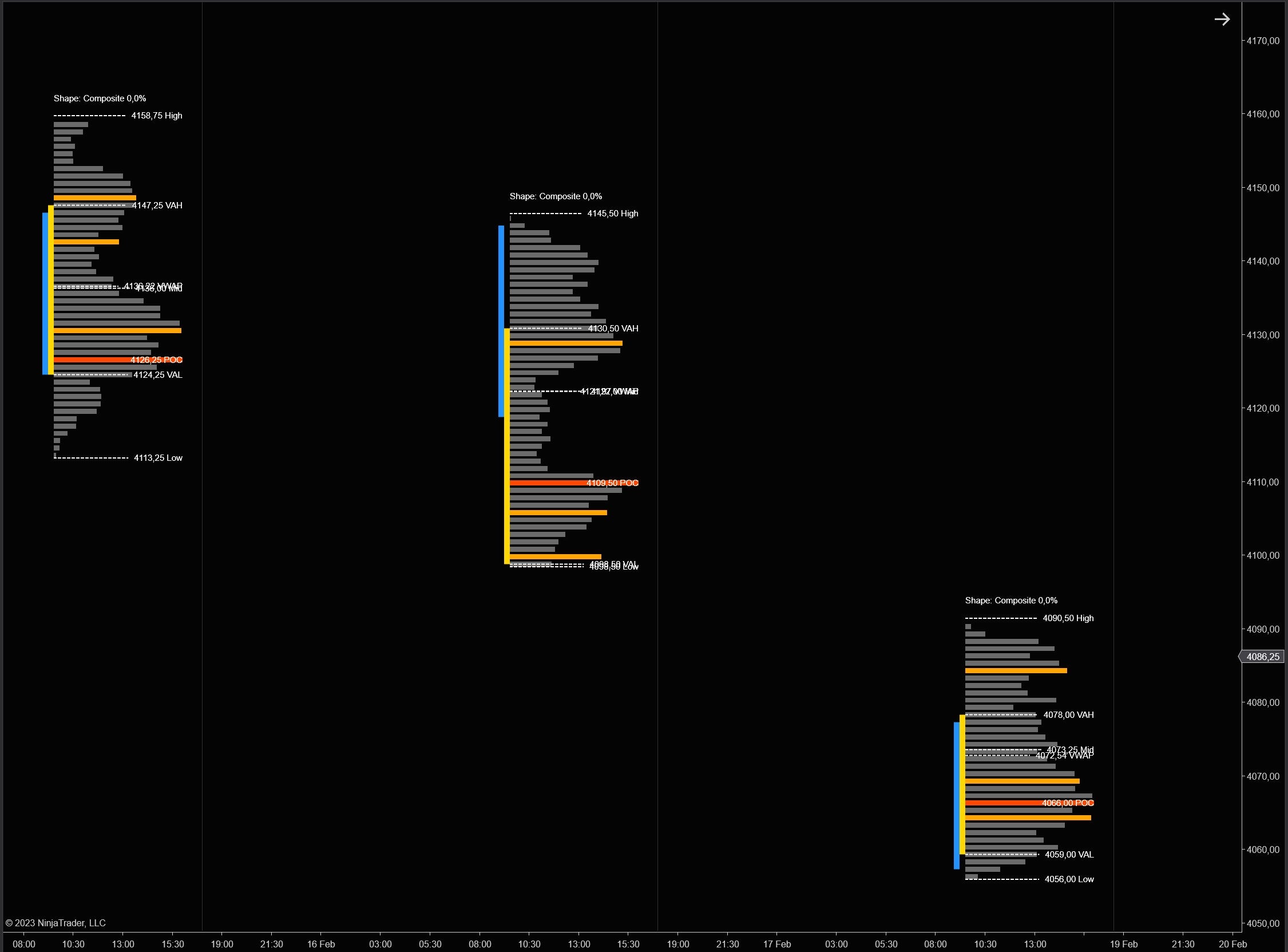
Every profile automatically calculates 7 key levels. These are the prices that matter most — where to look for trades, set targets, and manage risk. Each level can be displayed as a line, a labeled line, or hidden. Configured independently for the current and previous profiles.
POC (Point of Control)
The single most important level in any volume profile. The POC is the price where the most volume traded — it's fair value. Price has a strong tendency to gravitate back to the POC.
- Magnet effect — When price moves away from the POC during the session, look for it to return.
- Support/resistance — Previous session POCs are powerful levels. Price often pauses or reverses at a prior day's POC.
- POC migration — When the POC shifts higher or lower during the session, it confirms directional momentum.
Value Area High & Low (VAH / VAL)
The price range where 70% of total volume traded (configurable). VAH is the top, VAL is the bottom. This is the "acceptance zone."
- Rejection trade — Price fails to break VAH or VAL? High-probability reversal back inside the value area.
- 80% rule — Price opens above VAH and trades back into the value area? There's an 80% chance it rotates all the way to VAL.
- The value area percentage is adjustable. Some traders use 68.2% (one standard deviation).
VWAP (Volume-Weighted Average Price)
The true average cost of all trades in the session, weighted by volume. This is the benchmark institutions use to measure execution quality.
- Trend filter — Price above VWAP = bullish bias. Below = bearish.
- Mean reversion — When price deviates far from VWAP, expect a snap-back.
- Institutional magnet — Large orders cluster around VWAP because that's where institutions target fills.
Session High
Highest traded price. A break signals new buying interest. A failure creates a double-top with volume context.
Session Mid
Midpoint between high and low. Quick directional filter: above mid = buyers in control, below = sellers.
Session Low
Lowest traded price. A break signals selling continuation. A hold with heavy volume = buying opportunity.
Display Controls
Every display option is configurable independently for current and previous profiles:
| Setting | Options | What It Controls |
|---|---|---|
| Pivots | None, Line, Line & Label | Whether to show lines, lines with labels, or nothing |
| Label Content | Price, Label, Price & Label | What the label text shows (price value, level name, or both) |
| Label Orientation | Left, Right | Which side of the profile the labels appear on |
| Extend Lines | On / Off | Extend pivot lines to the right edge of the chart |
| Show VWAP / MID / HIGH / LOW | On / Off each | Individual toggles for each supplementary level |
Extended Lines
Project the current profile's pivot lines forward to the right edge of the chart. See where today's POC, VAH, and VAL sit relative to current price, even when the profile is many bars to the left. Previous profiles have an even more powerful extension system — see Smart Line Extension.
Default Pivot Colors
6. High & Low Volume Nodes — The Levels That Matter Most
Volume nodes are the actionable price levels hidden inside the profile. HVNs are local peaks — where the market found consensus. LVNs are the gaps — thin zones the market rushed through. Knowing both is essential for every volume profile trader.
Low Volume Nodes (LVNs)
Price levels where very little volume traded — gaps in the auction. These are among the most tradeable signals the profile produces:
- Breakout acceleration — Price enters an LVN and there's nothing to stop it. It accelerates through. If you're in a trade heading into an LVN, let it run.
- Rejection boundaries — Price approaching an LVN may pause or reverse at the edge. The market hesitates before crossing into "thin air."
- Gap-fill targets — Unfilled LVNs from previous sessions are high-probability targets. Price tends to revisit them to build volume.
Default: 4 LVNs per profile, shown in white.
High Volume Nodes (HVNs)
Price levels with peak trading activity — local maxima in the volume distribution. Where the market found the most agreement.
- Strong support/resistance — Price returning to an HVN encounters the memory of heavy trading. Expect slowdowns, consolidation, or reversals.
- Magnet effect — In ranges, price gravitates toward HVNs and passes quickly through LVNs.
- Consensus clusters — Multiple HVNs at similar prices = strong structural level.
Default: 4 HVNs per profile, shown in orange. Disabled by default — enable with one click.
Node Settings
| Setting | Default | Description |
|---|---|---|
| Show Low Volume Nodes | On | Enable LVN markers on the profile |
| Number of LVNs | 4 | How many local minima to highlight |
| Region Size (LVN) | 1 | Neighborhood size for detection. Higher values detect broader LVN regions. |
| Extend (LVN) | None | None = no extension. Session = to end of profile. Forward = to chart right edge. |
| Extend Count (LVN) | 1 | How many sessions back to show extended lines |
| Show High Volume Nodes | Off | Enable HVN markers on the profile |
| Number of HVNs | 4 | How many local maxima to highlight |
| Region Size (HVN) | 1 | Neighborhood size for HVN detection |
| Extend (HVN) | None | Extension mode for HVN lines (None, Session, Forward) |
| Extend Count (HVN) | 1 | How many sessions back to extend HVN lines |
Colors: HVN markers default to Orange (20% opacity when extended). LVN markers default to White (20% opacity when extended). All fully customizable.
7. Smart Line Extension — Keep Yesterday's Levels Alive
Yesterday's POC, VAH, VAL, and VWAP don't lose their significance when a new session starts. They're your battle lines for today. This feature extends them forward — and intelligently removes them when the market deals with them.
Three Extension Modes
| Mode | Behavior | Best For |
|---|---|---|
| Forever | Lines extend indefinitely to the right | Seeing all historical levels as a permanent reference grid. Spot confluences across sessions. |
| Until Broken | Lines stop when price closes through the level | Only showing levels that are still intact. A broken level disappears automatically. |
| Until Tested | Lines stop when price touches the level | The most aggressive cleanup. Only untested levels remain — the ones the market hasn't dealt with yet. |
| Setting | Default | Description |
|---|---|---|
| Extend Previous Lines | On | Master toggle for extending previous pivot lines |
| Extend Count | 1 | How many previous sessions to extend (1 = yesterday only) |
| Extend Until | Until Tested | When to stop: Forever, Until Broken, Until Tested |
8. TPO Overlay — Add the Time Dimension
Volume shows conviction. Time shows acceptance. The TPO (Time Price Opportunity) overlay adds a second dimension to the profile: how long the market spent at each price, not just how much volume traded there.
◈ Volume vs. Time Divergence
A price level with high volume but low TPO means a lot traded in a short burst — aggressive initiative activity, often the start of a move. High TPO but low volume means the market lingered without conviction — a potential breakout zone. These divergences are powerful signals.
◈ TPO Gets Its Own POC & Value Area
The TPO overlay calculates a separate POC (the price level with the most time periods) and separate VAH/VAL. Compare where volume says fair value is vs. where time says fair value is. When both agree, the level is rock-solid. When they diverge, the market is in transition.
| Setting | Default | Description |
|---|---|---|
| Show TPO Outline | Off | Toggle the TPO overlay on the profile |
| Inside Value Area Stroke | DodgerBlue, Dash, 2px | Color for TPO bars inside the TPO value area |
| Outside Value Area Stroke | Red, Dash, 2px | Color for TPO bars outside the TPO value area |
9. Auto Profile Splitting — Reveal the True Structure
When the market shifts value during a session (morning range, then an afternoon breakout), a single profile gives you a misleading POC and Value Area because they average across unrelated distributions. Auto-splitting fixes this by detecting the composite shape and splitting it into sub-profiles.
Without Splitting
One blended profile with a POC that sits between two distributions — a price level that may not even matter. The value area spans the entire range, masking the real structure.
With Splitting
Each distribution gets its own POC, Value Area, and HVN/LVN analysis. Now you see the true market structure — separate fair values for each phase of the session.
Four Profile Shapes
Splitting Settings
| Setting | Default | Description |
|---|---|---|
| Enable Auto-Split | Off | Automatically detect and split composite profiles |
| Shape Threshold (%) | 60 | Volume % needed in one region to classify as P or D. Higher = stricter detection. |
| Min Split Time (%) | 15 | Minimum session time % before splitting is considered. Prevents premature splits. |
| Min Split Volume (%) | 10 | Minimum volume % in the split region. Filters out noise. |
10. Visual Customization — Make It Yours
Every aspect of the profile's appearance is adjustable. Width, resolution, smoothing, orientation, outline — dial in exactly the look you want.
Profile Width
Compact (40% — Default)
Profile bars extend up to 40% of the session's horizontal space. Clean and compact, leaving room for the candles.
Full Width (100%)
The profile spans the entire session, creating a dramatic volume overlay that fills the background. At 20-30%, it sits neatly alongside the candles.
Tick Aggregation
1 Tick Per Level
Maximum resolution. Every price tick gets its own bar. Most granular but most dense. Best for detailed analysis on ES, NQ, YM, CL.
4 Ticks Per Level (Default)
Aggregates 4 ticks per bar. The sweet spot — clear distribution shape without the noise of individual tick data.
Profile Smoothing
Normal
The raw volume distribution. Every bump and dip visible. Maximum precision for traders who read raw data.
Smoothed
Smoothing removes jagged noise and reveals the underlying shape. The smoothing period (default: 8) controls the intensity — higher = smoother. Great for shape analysis and weekly/monthly profiles.
Orientation
Left (Default)
Profile builds from the left side of the session toward the right. Anchors at the session open.
Right
Profile builds from the right side toward the left. Places the volume data immediately adjacent to the latest candles.
Resolution (Data Granularity)
| Resolution | Default | Use Case |
|---|---|---|
| Second | 1-second | Default. Best balance of accuracy and performance. Good buy/sell volume split. |
| Minute | 1-minute | Faster processing, lower precision. Good for weekly/monthly profiles or slower machines. |
| Tick | 1-tick | Maximum precision for buy/sell split. Highest processing cost. Use when tick data is available. |
More Display Settings
| Setting | Default | What It Does |
|---|---|---|
| Value Area (%) | 70 | Volume percentage that defines the value area |
| Vertical Spacing | 2 px | Gap between volume bars. Increase for airier look. |
| Vertical VAL Line Width | 10 px | Width of the vertical value area boundary markers |
| Show Outline | Off | Draws a smooth outline around the profile shape |
| Profiles to Show | 0 (all) | Limits rendered profiles. Set to 3-5 for performance. |
| Update Historical Plots | Off | When on, populates plot values for historical bars (needed for backtesting) |
| Show Session Total Volume | On | Displays total volume + price range text at the bottom of each profile |
11. Volume & Delta Text — See the Numbers
Display numeric volume or delta values next to each price level. Configurable independently for current and previous profiles.
12. Paint Bars — Unified Chart Appearance
Override the default NinjaTrader candlestick colors so your candles match the volume profile's visual style. Or hide them entirely for a pure Market Profile view.
| Setting | Default | Description |
|---|---|---|
| Enable Paint Bars | On | Override candlestick colors |
| Show Paint Bars | Back | Back = behind profile. Front = on top. Hide = invisible candles (profile only). |
| Up Bar Color | LimeGreen | Fill for bullish candles |
| Down Bar Color | Red | Fill for bearish candles |
| Up Bar Outline | White | Border for bullish candles |
| Down Bar Outline | White | Border for bearish candles |
13. Easy Access Toolbar — Change Settings Without Leaving the Chart
An interactive menu built directly into the NinjaTrader chart window. No settings dialogs, no multi-step menus. Just click and go.
Everything at Your Fingertips
- Enable / Disable with one click
- Profile type — switch between Daily, Weekly, Monthly, etc.
- Color mode — Mono, Heatmap, Buy/Sell, Delta, Delta & Volume
- Number of profiles to render
- Current profile — orientation, pivots, labels, extension, volume text
- Previous profiles — orientation, pivots, labels, extension settings
- HVN / LVN — toggle, counts, region size, extension
- Smoothing — toggle and period
- Auto-splitting — toggle and thresholds
- Paint bars — toggle and Z-order
- Outline toggles — VP outline, TPO outline
- Level toggles — VWAP, MID, HIGH, LOW individually
- Session divider — toggle
- Session total volume — toggle
- Recalculate — force full profile recalculation
Numeric fields support mouse wheel adjustment. Toggle items show a checkbox indicator for current state.
14. NinjaScript Plots — Build Strategies on Volume Profile Data
Every key level is available as a NinjaScript plot. Use them in AlgoStudio Pro, Market Analyzer, alert conditions, or your own custom strategies. 22 plots — 11 for the current profile, 11 for the previous.
Current Profile (Plots 0–10)
Previous Profile (Plots 11–21)
The exact same 11 plots, but for the previous session's profile. This gives you programmatic access to yesterday's POC, VAH, VAL, VWAP, node prices, and TPO levels.
- Mean reversion — Go long below Previous VAL, target Previous POC. Short above Previous VAH, target Previous POC.
- Breakout — Enter when price breaks above Previous VAH with volume confirmation.
- LVN acceleration — When Current LVN Distance (ticks) approaches zero, position for the fast move through.
- VWAP fade — Fade extreme deviations from Current VWAP, targeting snap-back.
- Value area rotation — If price opens above Previous VAH and re-enters the value area, target Previous VAL.
- Market Analyzer — Add POC, VAH, VAL, VWAP columns to your watchlist for multi-instrument level monitoring.
Update Historical Plots is Off by default. Plot values are only populated in real-time. Enable it if you need historical plot values for backtesting — but expect longer chart load times.15. Complete Settings Reference
Every configurable setting, organized by category. The indicator intelligently shows/hides settings based on your selected profile type — you'll only see the fields relevant to your current configuration.
Settings are organized into logical categories. Use the Easy Access Toolbar for quick changes, or the full NinjaTrader properties dialog for detailed configuration.
Parameters
| Setting | Default | Description |
|---|---|---|
| Profile | Daily Session | Profile type: All Bars, Every X Bars, Custom Session, Daily, Weekly, Monthly, Visible Range, Fixed Interval |
| Bar Count | 10 | Bars per profile (Every X Bars mode) |
| Custom Session #1 Start / End | 09:30 / 16:00 | First custom time window (HH:mm format) |
| Custom Session #2-5 Start / End | Empty | Additional custom time windows (up to 5 total) |
| Interval Start / End Time | 00:00 / 23:59 | Time bounds for Fixed Interval mode |
| Interval Duration (min) | 120 | Duration of each fixed interval block |
| Color Mode | Buy/Sell | Mono, Heatmap, Buy/Sell, Delta, Delta & Volume |
| Resolution | Second | Data granularity: Minute, Second, Tick |
| Resolution Interval | 1 | Interval for the resolution setting |
| Ticks Per Level | 4 | Tick aggregation per volume bar |
| Profile Width (%) | 40 | Profile width as % of session width |
| Vertical Spacing | 2 | Pixel gap between bars |
| Value Area (%) | 70 | Volume % defining the value area |
| Enable Smoothing | Off | Toggle profile smoothing |
| Smoothing Period | 8 | Smoothing intensity (higher = smoother) |
| Show Outline | Off | Draw outline around profile shape |
| Vertical VAL Line Width | 10 | Width of value area boundary markers |
| Show Session Divider | On | Vertical lines between sessions |
| Profiles to Show | 0 (all) | Limit rendered profiles (0 = all) |
| Show Session Total Volume | On | Volume + range text at profile bottom |
| Show VWAP Line | On | Toggle VWAP level |
| Show MID Line | On | Toggle session midpoint |
| Show HIGH Line | On | Toggle session high |
| Show LOW Line | On | Toggle session low |
| Update Historical Plots | Off | Populate plot values for historical bars |
Current Profile
| Setting | Default | Description |
|---|---|---|
| Orientation | Left | Profile growth direction |
| Pivots | Line & Label | None, Line, Line & Label |
| Label Location | Right | Label side (Left or Right) |
| Label Content | Price & Label | Price, Label, or Price & Label |
| Extend Lines | Off | Extend current lines to chart edge |
| Volume Text | None | None, Total Volume, Delta, Volume & Delta |
Previous Profiles
| Setting | Default | Description |
|---|---|---|
| Orientation | Left | Profile growth direction |
| Pivots | Line & Label | None, Line, Line & Label |
| Label Orientation | Right | Label side |
| Label Content | Price & Label | Price, Label, or Price & Label |
| Extend Lines | On | Extend previous pivot lines forward |
| Extend Count | 1 | Prev sessions to extend (1 = yesterday only) |
| Extend Until | Until Tested | Forever, Until Broken, Until Tested |
| Volume Text | None | None, Total Volume, Delta, Volume & Delta |
High/Low Volume Nodes
| Setting | Default | Description |
|---|---|---|
| Show Low Volume Nodes | On | Enable LVN detection |
| Number of LVNs | 4 | Local minima to highlight |
| Region Size (LVN) | 1 | Detection neighborhood size |
| Extend (LVN) | None | None / Session / Forward |
| Extend Count (LVN) | 1 | Sessions to extend |
| Show High Volume Nodes | Off | Enable HVN detection |
| Number of HVNs | 4 | Local maxima to highlight |
| Region Size (HVN) | 1 | Detection neighborhood size |
| Extend (HVN) | None | None / Session / Forward |
| Extend Count (HVN) | 1 | Sessions to extend |
Market Profile (TPO)
| Setting | Default | Description |
|---|---|---|
| Show TPO Outline | Off | Enable TPO overlay |
| Inside VA Stroke | DodgerBlue, Dash, 2px | TPO bars inside value area |
| Outside VA Stroke | Red, Dash, 2px | TPO bars outside value area |
Splitting
| Setting | Default | Description |
|---|---|---|
| Enable Auto-Split | Off | Auto-detect composite profiles |
| Shape Threshold (%) | 60 | Volume % for P/D classification |
| Min Split Time (%) | 15 | Min session time before splitting |
| Min Split Volume (%) | 10 | Min volume in split region |
Paint Bars
| Setting | Default | Description |
|---|---|---|
| Enable Paint Bars | On | Override candle colors |
| Paint Bars Z-Order | Back | Hide / Front / Back |
| Up Bar Color | LimeGreen | Bullish candle fill |
| Down Bar Color | Red | Bearish candle fill |
| Up Bar Outline | White | Bullish candle border |
| Down Bar Outline | White | Bearish candle border |
Colors
| Color Setting | Default |
|---|---|
| Inside VA Volume Up | Gold, 100% opacity |
| Inside VA Volume Down | DodgerBlue, 100% opacity |
| Inside VA Neutral | DimGray, 100% opacity |
| Outside VA Volume Up | Gold, 25% opacity |
| Outside VA Volume Down | DodgerBlue, 25% opacity |
| Outside VA Neutral | DimGray, 100% opacity |
| Heatmap High | Red |
| Heatmap Low | DodgerBlue |
| Outline | White, Dash, 2px |
| Session Divider | DimGray, Solid, 1px |
| Anchor Line | DarkGray, Dash, 50% opacity |
| POC | Yellow, Dash, 2px |
| Value Area High | Red, Dash, 2px |
| Value Area Low | Lime, Dash, 2px |
| VWAP | Cyan, Dash, 2px |
| Profile High | White, Dash, 2px |
| Profile Mid | DodgerBlue, Dash, 2px |
| Profile Low | White, Dash, 2px |
| Text Color | White |
| Font Size | 10 |
| HVN Marker | Orange, Solid, 2px |
| HVN Extended | Orange, 20% opacity |
| LVN Marker | White, Solid, 2px |
| LVN Extended | White, 20% opacity |
16. Free Trial & Pricing
Try It Free for 7 Days
Full access to every feature. No credit card. No commitment.
Download it, put it on your charts, and see where the real volume sits.
Everything Included
- 8 profile types (Daily, Weekly, Monthly, Custom, Fixed Interval, Visible Range, Every X Bars, All Bars)
- 5 color modes (Mono, Heatmap, Buy/Sell, Delta, Delta & Volume)
- HVN/LVN detection with smart extension
- TPO overlay with separate POC & Value Area
- Auto profile splitting with shape detection
- 22 NinjaScript plots for strategies & Market Analyzer
- Interactive chart toolbar
- Smart previous session line extension
- Up to 5 custom session windows
- All future updates included
Join Our Community
Get help, share setups, and connect with other volume profile traders in our Discord. Ask questions, request features, and stay updated on releases.
Join us on Discord — $1/year for community access, Q&A, and product support.
Customers also look at
The following products are often combined with the orderflow footprint indicator
Join us on discord
https://launchpass.com/tradedevils-indicators1/member
Want to chat with us and other traders? Got questions on our indicators ? Or want to know more about our products? Then join us on discord for just $1 a year