
Introducing SabrTrader
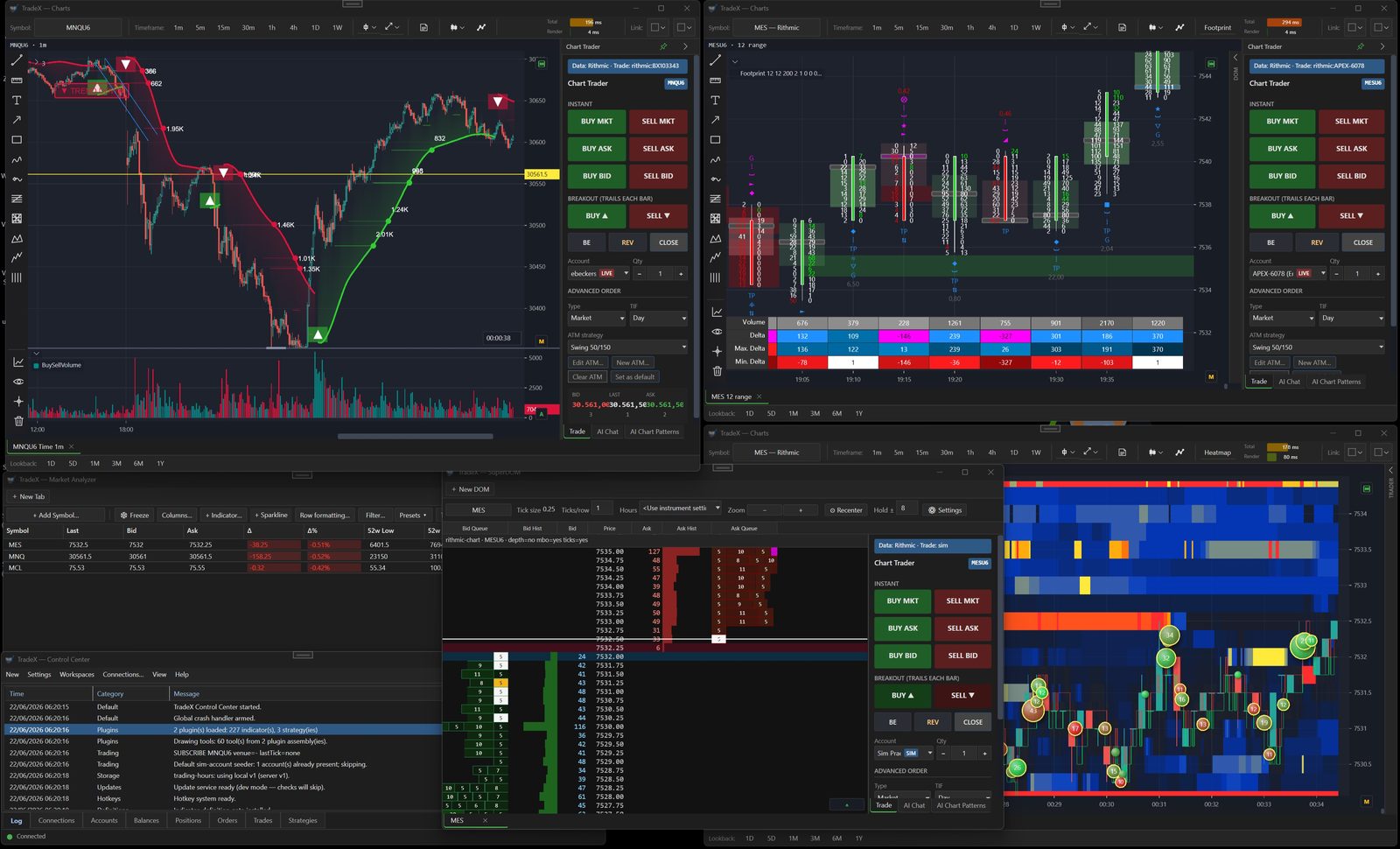
Everything we could never build inside NinjaTrader.
SabrTrader is our own platform. Full AI integration, every premium TradeDevils indicator rebuilt native, real order book data, multi asset and multi broker. Launching September.
Short version first, because I know that's the bit you actually care about. Nothing changes for TradeDevils. Your indicators keep working, keep getting updates, keep getting support from the same people.
If that's all you needed, you can stop reading. If you're curious what we've been building and why, the rest is for you.
Every good idea died in the same place
That's not a dig at NinjaTrader. It's a solid platform and we built a business on it. But when you write indicators inside someone else's application, you inherit every decision they made. Their chart engine decides how you draw. Their data layer decides what you're allowed to see.
If a feed exposes every individual order in the book but the host hands you a total per price level, then a total per price level is what you get. The idea stops there. After a while you keep a list of those, and ours got long.
See the book, not a summary of it
The heatmap paints resting liquidity across time. You watch size build at a level, then watch it pull. Volume renders as 3D bubbles on the same canvas, so aggressive trading sits directly on top of the passive liquidity it's hitting.
A wall forms, gets eaten, and you see whether price went through or bounced.

Order by order, not level by level
Most feeds give you a total: 300 lots at 5000.25. MBO gives you the individual orders behind that number, so you get queue position, and you can tell one trader with 300 lots apart from forty traders with a handful each.
Those look identical on a normal ladder and behave nothing alike when price arrives.

The footprint, with the handbrake off
You know our footprint. This is the same idea rebuilt on an engine we control: bid by ask clusters, delta, imbalances, absorption, traps, sweeps, big trade markers, volume profile inside the bar. More than thirty signal families, and it stays smooth when you zoom out across a whole session.


Everything you know from us, rebuilt native
Not ports running in a compatibility layer. Rewritten as first class components of the platform.


Futures, stocks, forex, options, crypto
Same application, same charts, same indicators. That reads like a bullet point but it was the hard part, because a forex position, a futures contract and a crypto perp each mean something different by the word "quantity", and each wants its own handling on sizing, rounding and PnL.
You bring your own connections: IBKR, Saxo, OANDA, cTrader, Tradier, Alpaca, FXCM, 22 crypto exchanges, plus Rithmic, CQG, dxFeed and Tradovate for data. Take data from one, execute at another. We never hold your money.
And yes, multiple Rithmic connections at once. Bulenox and Apex logged in side by side, in the same application, each with its own accounts and its own charts. If you run evaluations across several prop firms you have probably been alt tabbing between windows for years. You do not have to any more.

Built into the order engine, not bolted on
If you run prop accounts next to a personal one you know the routine. Fill on the master, wait, hope the follower gets it, hope the stop turns up with it.
Because the copier lives inside the same engine that placed the original order, the protective legs mirror together with the entry instead of arriving late on a naked position. Each account keeps its own sizing and its own risk limits.

The AI is the bit I am worst at explaining
This is probably our single biggest difference from anything else you can run, and it is almost invisible in a screenshot. You have to sit with it for an afternoon before it clicks, which makes it a nightmare to put on a feature list.
Let me be clear about what it is not. It is not signals. Nothing tells you to buy or sell, and nothing gets traded because a model had an opinion.
What it is: the platform can hand a model everything on your screen. The bars, every indicator you have loaded with its actual values, your open position, your working orders, the order flow underneath. So the conversation is about your chart rather than about trading in general.

Ask about what is in front of you
Why does this level keep holding. What did the flow do into that high. Is my stop sitting somewhere stupid. It answers from your chart and your position, not from a textbook.
It can draw too. Ask it to mark the range or clear your annotations and it edits the chart directly.

Describe it instead of building it
Alerts in plain English rather than assembled from six dropdowns. Strategies described in a sentence and turned into something you can run through the backtester and pick apart.
The analyst also sits in the SuperDOM and the Market Analyzer, so the same thing works on the ladder and across a whole watchlist.

It reviews you, not the market
After the session it goes through your trades and finds the patterns you cannot see from inside them. When you size up after a loss. Which hour of the day quietly costs you money. The setup you believe in that has not paid since spring.
It is the least comfortable feature we have built and probably the most useful.
You bring your own API key and choose the provider: Claude, OpenAI, Gemini or Grok. We do not resell tokens, we are not marking anything up, and you are not stuck with whichever model we happened to pick this year. Your keys stay on your machine.
None of this could exist as an indicator. Handing a model your live position, your working orders and your indicator values at once means reaching into every layer of the application at the same time. It is the clearest example I have of why we needed our own platform.
Backtesting that attacks your idea
Tick level, with real in sample and out of sample splits, walk forward and parameter sweeps. On top sits the Auto Strategy Builder, which generates strategies and then spends most of its effort trying to destroy them. Monte Carlo, walk forward, sensitivity. Anything that only worked because of one lucky stretch of history is gone before you ever see it.


And if you do write C#, there is an open SDK with documented APIs for indicators, strategies, bar types, drawing tools, panels, even your own broker connections.
What this means for your TradeDevils indicators
I've watched enough companies do the quiet version of this. A new product launches, nobody says anything about the old one, and eighteen months later the existing customers work out that the updates went thin and nobody is coming. It is never announced. It just happens.
So here it is in writing.
- TradeDevils stays a business. Not a legacy product, not maintenance mode.
- Your licences keep working, on the same terms you bought them on.
- Updates continue. NinjaTrader ships changes and we keep up, same as always.
- Support is the same people. Same Discord, same inbox, same response times.
- New features still land there. The indicator work has not stopped and is not going to.
Some things genuinely cannot cross back. Order by order rendering, the copier, the backtesting engine: those need control of the whole application to exist at all. That is not us holding out on you, it is the same wall we spent years hitting and the reason SabrTrader exists. Where something can be done in NinjaTrader, we will keep doing it in NinjaTrader.
Being straight about the direction
SabrTrader is where the future is for us, and not because we lost interest in anything else. It is because on our own platform there is no wall. If we want to change how the book renders, we change it. If a feed exposes something new, we can use it that week. When you ask for something reasonable, the answer can be yes instead of a long explanation about what the host platform permits.
That gap only widens with time, and I would be doing you a disservice by pretending otherwise.
But that is our roadmap, not your decision. You know your setup better than I do.
Official launch, and we will walk you through it
SabrTrader launches officially in September. You can download and use it before then, that is not a waiting list, but September is when we stop building quietly and start properly supporting it.
Around the launch we are running a series of introduction webinars. Live, not recorded slides. We go through the platform end to end, set up a chart from scratch, show the order flow tools and the copier on real accounts, and spend a decent chunk of it on the AI, since that is the part that does not survive being described in text.
You can ask anything during them, including the awkward questions about what happens to your NinjaTrader indicators. I would rather take those live.
Dates go out in Discord and on YouTube first, so join whichever you prefer if you want a seat.
The TradeDevils Discord is not going anywhere. This is an additional room, not a replacement.
Two weeks with everything unlocked
There is a free version. Not a crippled demo, the real platform with real charting, and you can stay on it as long as you like. For the first two weeks every paid feature is open: the full order flow suite, the copier, the AI, the backtesting, all of it.
Long enough to run it through real sessions on the instruments you actually trade, and then decide with the software in front of you rather than from a blog post.
Download SabrTrader freeNo card required.
Read more first: what's in it · the indicator suite · pricing
Or come and see it live at one of the September webinars: SabrTrader Discord · YouTube channel
Questions about what this means for the indicators you already own? Ask me in either Discord, ours or the TradeDevils one. I would rather answer directly than have anyone guessing.